
Quick answer
To withdraw from Paisa X Go, bind a JazzCash or Easypaisa wallet in your own name, complete any turnover on bonuses, tap Withdraw, enter at least the minimum shown and submit. Payouts are usually reported within a few minutes to a few hours. Never pay a "withdrawal fee" to anyone's personal number.
Paisa X Go Game Guide — independent guide
A Paisa X Go withdrawal moves your winnings from the game balance to your JazzCash or Easypaisa wallet. Whether you write Paisa X Go, PaisaXGo or Paisa XGo, the process is the same: bind a wallet, meet any turnover rule and request the payout.
This independent guide explains each step, what "pending" really means and how to avoid fake "withdrawal fee" scams. Limits, fees and timings change, so always check the amounts shown in your own app.
Paisa X Go · 01
Paisa X Go Withdrawal at a Glance
| Detail | What you should know |
|---|---|
| Methods | JazzCash and Easypaisa are widely reported; bank transfer appears in some versions. |
| First step | Bind a wallet in your own name before you request a payout. |
| Minimum withdrawal | Shown on the withdrawal screen. It can change over time. |
| Turnover | Bonus money, and sometimes deposits, must be played through first. |
| Processing time | Usually a few minutes to a few hours; longer during checks or busy periods. |
| Fees | Any charge is shown on the withdrawal screen. Never pay a "fee" to a personal number. |
| Tracking | Every request appears in Withdrawal Records with its status. |
Paisa X Go · 02
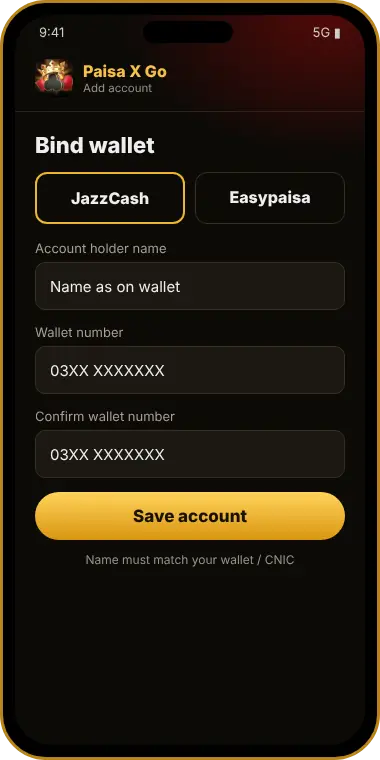
Paisa X Go Bind Wallet: Add Your JazzCash or Easypaisa Account
Before your first Paisa X Go withdrawal, the app asks you to bind (link) a payout account. This is where your money goes, so get it right.
- Open Withdraw or Wallet — Choose Bind Account, Add Wallet or Add Bank.
- Choose the method — JazzCash, Easypaisa, or bank if it is shown.
- Enter the account name — Use your name exactly as it appears on the wallet.
- Enter the account number — Your wallet mobile number or bank account. Check every digit.
- Confirm — Some versions ask for an OTP or a withdrawal password.
In many versions a bound account is hard to change later. A wrong number or a wallet in someone else's name is one of the most common reasons withdrawals fail.
Paisa X Go · 03
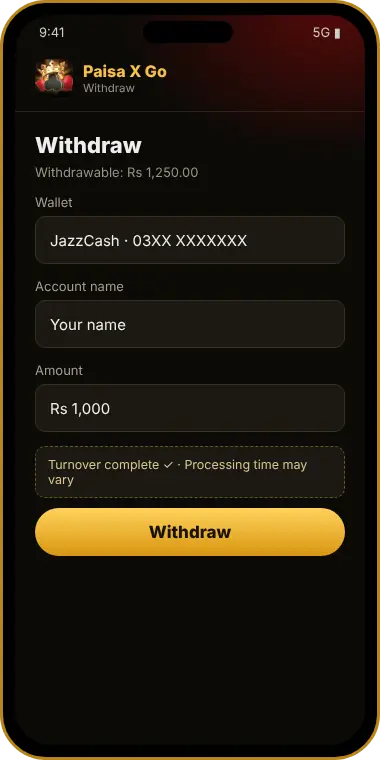
How to Do a Paisa X Go Withdrawal Step by Step
- Log in — Open the app and sign in; see our login guide if needed.
- Tap Withdraw — It is usually on the home screen or in the wallet section.
- Check withdrawable balance — Bonus money that has not met turnover may be shown separately.
- Enter the amount — At least the minimum shown on the screen.
- Select your bound wallet — Enter your withdrawal password if asked.
- Submit and note the order ID — Then watch the status in your records.
For a Paisa X Go withdraw to JazzCash, the money arrives in your JazzCash wallet with the usual SMS. A Paisa X Go withdraw Easypaisa request works the same way.
Paisa X Go · 04
Paisa X Go Turnover (Wagering) Explained
Turnover, also called wagering, is the total amount you must bet before certain money becomes withdrawable. It is the most common reason players see "turnover not completed".
Example only (made-up numbers to explain the idea): Suppose you receive a Rs. 100 bonus with a 10x turnover rule. You would need to place Rs. 1,000 in total bets (100 × 10) before that bonus can be withdrawn. At Rs. 50 per round, that is 20 rounds. The real rule in your app may be completely different.
Turnover counts the amount you bet, not what you win, and some games may count differently. Check the bonus details in your app to see how much is left. If you would rather avoid this, you can usually decline a bonus. Rewards from official gift codes, covered on our redeem code page, may carry similar rules.
Paisa X Go · 05
Paisa X Go Minimum Withdrawal and Withdrawal Time
The Paisa X Go minimum withdrawal is shown on the withdrawal screen and can change after updates. There may also be a daily limit on the number or total of withdrawals.
The Paisa X Go withdrawal time is reported to be usually a few minutes to a few hours. First withdrawals, larger amounts and busy periods can take longer because of extra checks.
Paisa X Go · 06
Paisa X Go Withdrawal Pending: What It Means
A Paisa X Go withdrawal pending status means your request was received but not yet paid. It may be in a queue, under a routine check, or moving through the wallet network.
How long should you wait?
Give it a few hours before worrying. If it is still pending after a day, contact official in-app support with your order ID. Avoid cancelling and resubmitting again and again, as this can restart the process.
Pending vs rejected
A rejected withdrawal is different. Normally the amount returns to your game balance, so read the reason shown, fix it and try again.
Paisa X Go · 07
Paisa X Go Withdrawal Not Received: Problems and Fixes
| Detail | What you should know |
|---|---|
| "Turnover not completed" | Check how much is left in the bonus details and keep play within your budget. |
| Pending for a long time | Wait, then contact support with the order ID, amount, time and wallet number. |
| Success, but no money | Check your wallet SMS and history for delays, then send support the order ID and a screenshot. |
| Rejected: name mismatch | The wallet must be in your own name. Ask official support how to correct the binding. |
| Wrong wallet number | Contact support immediately. Payouts to a wrong number may not be recoverable. |
| Below minimum | Increase the amount to at least the minimum shown. |
| Account frozen | Often linked to multiple accounts or unusual activity. Only official support can review it. |
Paisa X Go · 08
"Withdrawal Fee" and Fake Agent Scams
Warning: If anyone asks you to pay a "withdrawal fee", "tax", "unlock charge" or "VIP upgrade" to a personal JazzCash or Easypaisa number before your winnings are released, it is a scam. Real withdrawals are requested inside the app, and any charges are shown on the withdrawal screen.
Scammers find players in WhatsApp groups and comment sections, often using screenshots of "big withdrawals" as bait. Our Paisa X Go real or fake review and tricks guide explain more warning signs.
Paisa X Go · 09
Track Withdrawals and Keep Withdrawal Proof
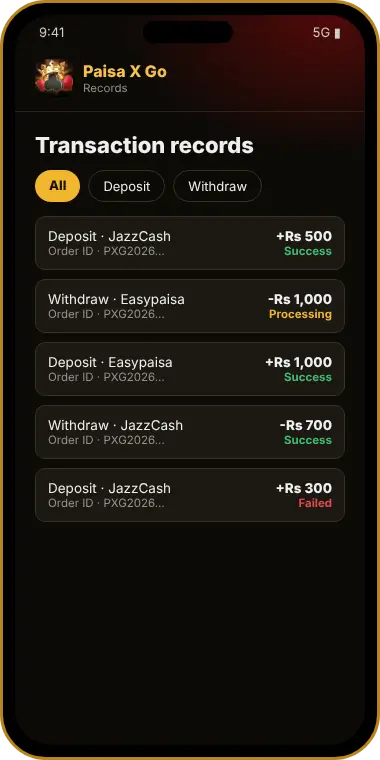
Open Withdrawal Records or Transaction History to see every request with its order ID, amount, time and status.
Many players search for Paisa X Go withdrawal proof. The best proof is your own: the success record in the app plus the incoming SMS from JazzCash or Easypaisa. Screenshots posted by strangers can be edited and are often used by scammers.
Paisa X Go · 10
Tips for Smooth Withdrawals
Paisa X Go · 11
Final Word on Paisa X Go Withdrawal
A smooth Paisa X Go withdrawal comes down to three things: a wallet bound in your own name, completed turnover and patience while the request is processed. New here? Start with our register guide, then read the deposit guide.
Winnings are never guaranteed, and real money can be lost. Play only with money you can afford to lose, take breaks and stop if it stops being fun. You must be 18+, and you should check local law. See our disclaimer.
Questions & answers
Paisa X Go Withdrawal – FAQs
How do I make a Paisa X Go withdrawal?
Bind a JazzCash or Easypaisa wallet in your own name, tap Withdraw, enter at least the minimum amount, select your wallet and submit.
How long does a Paisa X Go withdrawal take?
It is usually reported to take a few minutes to a few hours. First withdrawals and busy periods can take longer.
Why is my Paisa X Go withdrawal pending?
The request is still in the queue, under review or being sent through the wallet network. If it stays pending for a day, contact official support with your order ID.
What is turnover in Paisa X Go?
Turnover is the total amount you must bet before bonus money, or sometimes deposits, can be withdrawn. Check the exact rule in your app.
What is the Paisa X Go minimum withdrawal?
It is shown on the withdrawal screen and can change, so check your app rather than old videos.
Can I withdraw to someone else's wallet?
It is not recommended. Withdrawals are often rejected when the wallet name does not match your account.
Someone asks for a withdrawal fee. Is it real?
No. Paying a fee to a personal number to release winnings is a scam. Only use the Withdraw section inside the app.
Can I change my bound wallet?
In many versions this is difficult or needs official support, so bind the correct wallet the first time.
Get started
Ready to try Paisa X Go?
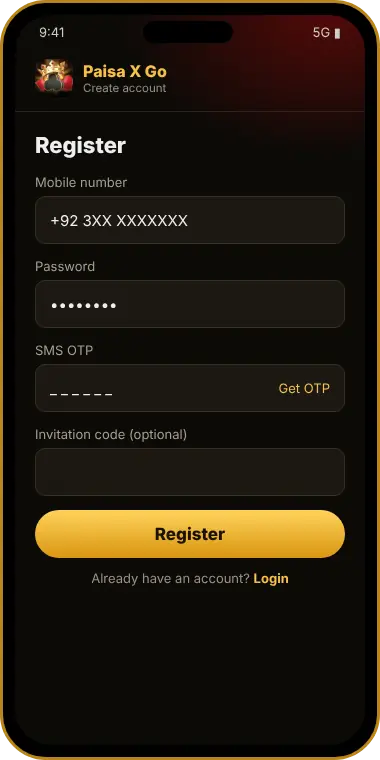
Get the latest APK, register with your mobile number and play responsibly.
- Free Android APK — not on Google Play
- JazzCash & Easypaisa reported for payments
- 18+ only · play with money you can afford to lose
Paisa X Go guides
More Paisa X Go Guides
 DownloadPaisa X Go Download – APK Latest Version for AndroidPaisa X Go download guide: get the APK latest version for Android safely, install and update it, avoid fake mod files a…
 RegisterPaisa X Go Register: Sign Up & Create Your AccountPaisa X Go register guide for Pakistan: sign up with your mobile number, password and OTP, use invite codes safely and …
 LoginPaisa X Go Login: App, Web Login & Password Reset GuidePaisa X Go login guide for Pakistan: sign in on the app or web, reset a forgotten password, fix OTP and login problems,…
 DepositPaisa X Go Deposit: JazzCash & Easypaisa Add Money GuidePaisa X Go deposit guide: add money with JazzCash or Easypaisa, check the minimum shown in your app, track transaction …
 Redeem CodePaisa X Go Redeem Code Today: Where to Find It and How to Use ItPaisa X Go redeem code guide for Pakistan: where today's real codes are posted, how to redeem step by step, why codes f…
 For iOSPaisa X Go for iPhone: How to Play on iOS Without an APKPaisa X Go for iPhone explained: why the APK won't work on iOS, what we found on the App Store and how to play in Safar…
 For PCPaisa X Go for PC: Play on Windows, Laptop and MacPaisa X Go for PC guide: play the web version in a browser or install the APK in an Android emulator like BlueStacks, p…
 Old VersionPaisa X Go Old Version – Is It Safe to Download?Paisa X Go old version explained: why players want v3 or the 60 version, the risks of old and mod APKs, how to install …
 TricksPaisa X Go Tricks: Honest Smart-Play Tips (No Hacks)Paisa X Go tricks explained honestly: why hacks, mod APKs and predictors fail, popular trick myths vs reality, and smar…